


Strategic Design Studies: Variables, Constraints, and Goals for Optimal Design Selection.
The ability to refine and optimise mechanical designs before they reach the production phase is paramount. This article delves into the intricate process of design optimisation in SolidWorks, specifically focusing on the innovative integration of sensors to enhance design accuracy and efficiency. Through a step-by-step breakdown, I will guide you through the essential stages of this optimisation process, from the initial model construction to the final validation of the chosen design scenario.
By the end of this article, you will gain a comprehensive understanding of how each step in the optimisation process contributes to creating a more efficient, reliable, and cost-effective design. You will learn the significance of simulating real-world conditions, the importance of incorporating safety margins, and the advantages of continuous monitoring and adjustment of critical design parameters. Moreover, this article will show how these practices can drastically save time by reducing the need for extensive physical testing and iterations, ultimately accelerating the development cycle and bringing robust, optimised designs to fruition with greater speed and confidence.
Guidelines for Optimisation
Model Construction: Initiate your design process in SolidWorks by creating a detailed model. This foundational step is crucial as it sets the stage for subsequent modifications and evaluations, allowing for a thorough analysis of the design’s feasibility and performance under various conditions
Starting a Static Simulation Study: Proceed to set up a new static simulation study. Here, we’ll be configuring the simulation environment, starting with selecting ‘plain carbon steel’ for the bracket material. This material is chosen for its widespread availability and balanced properties, such as strength and ductility, making it a standard choice in engineering applications.
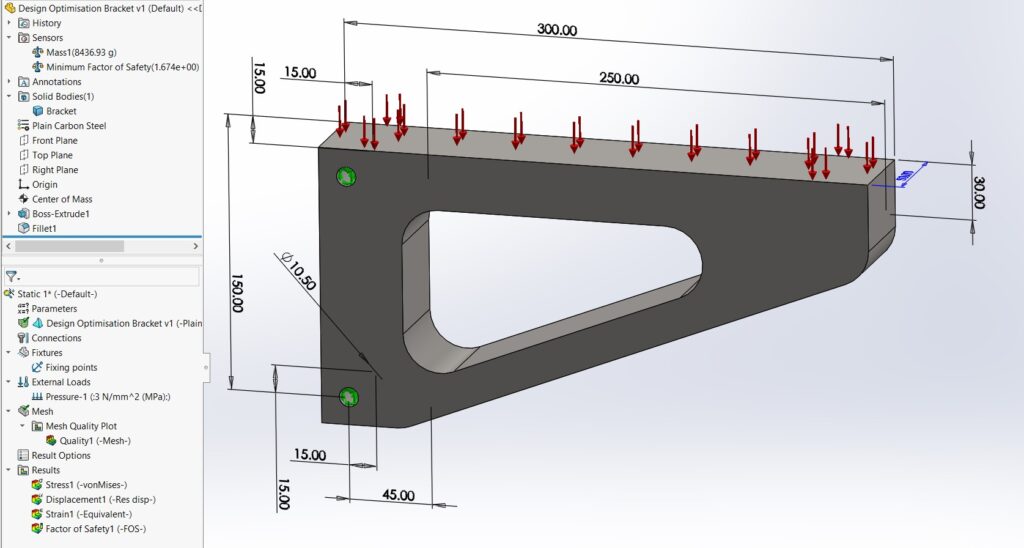
Fixture Application: Apply fixtures to the model at specified locations, particularly the two fixing holes. Fixtures are essential in simulation studies as they mimic how the part would be supported or restrained in real-world applications, providing more accurate and relevant results by ensuring the simulation considers the physical constraints and interactions of the design.
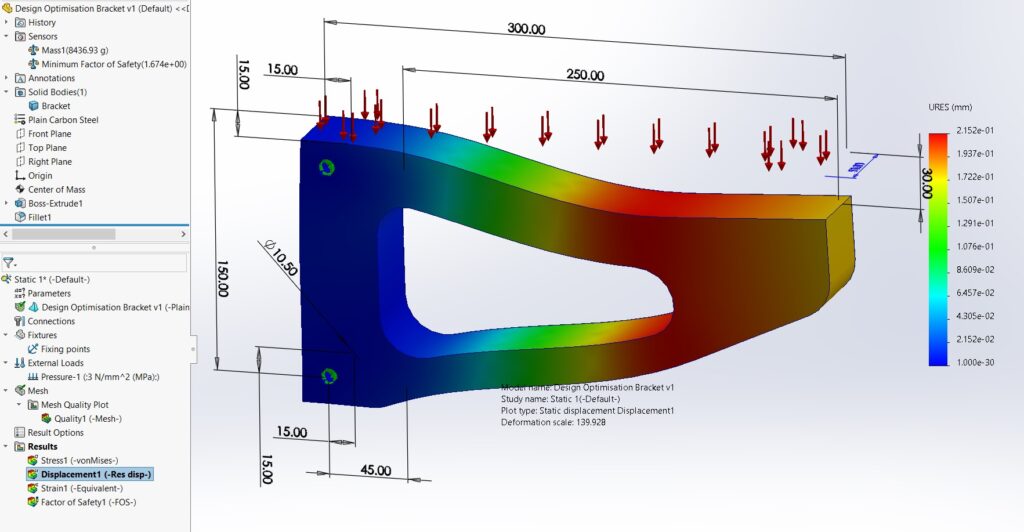
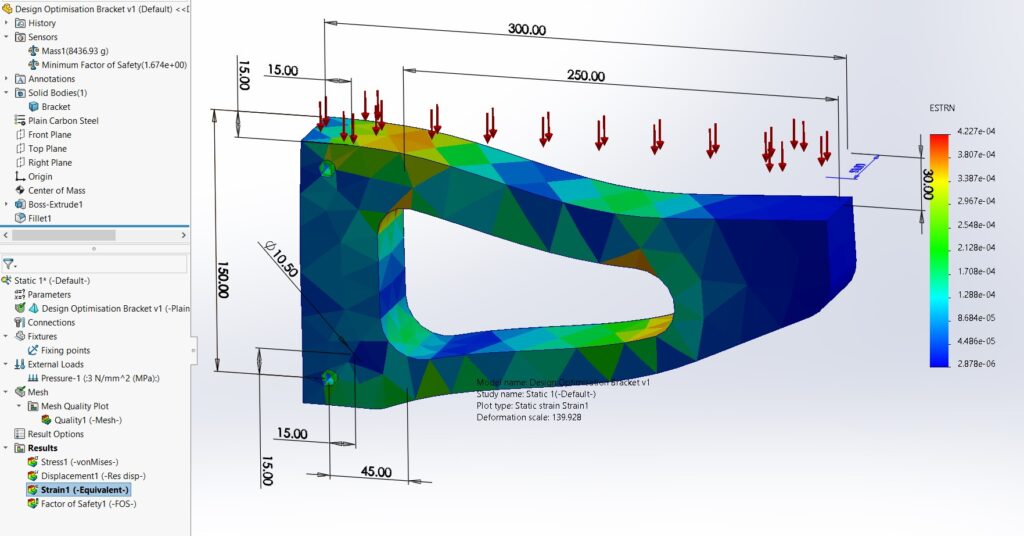
External Load Application: Apply a pressure of 2N/mm² (MPa) to the top surface of your model and run the simulation. This step is critical for assessing the design’s structural integrity under operational loads and identifying potential failure points or areas that may require reinforcement, thus ensuring the design’s suitability for its intended application.
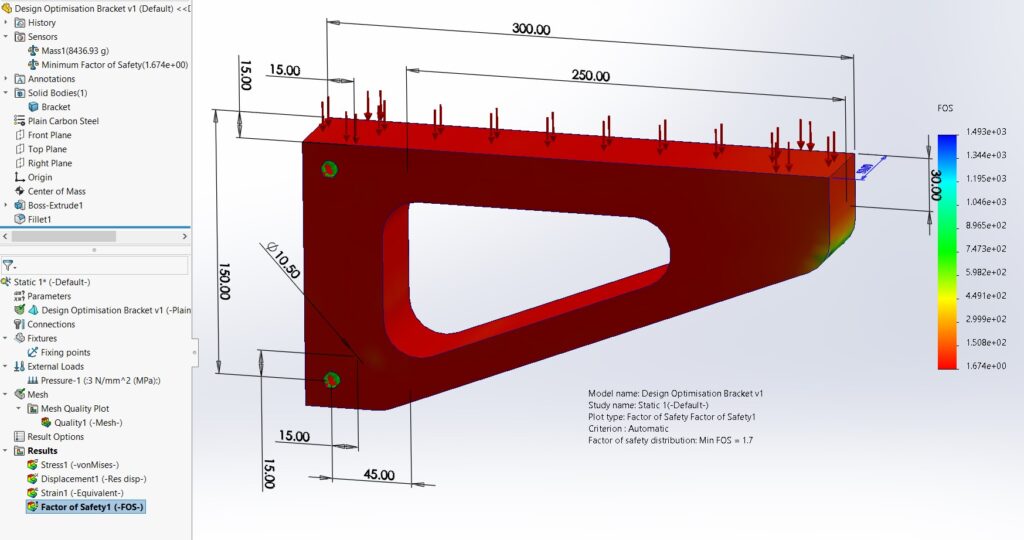
Factor of Safety Analysis: Establish a Factor of Safety (FoS) analysis, then increase the applied pressure to 3N/mm² (MPa) and conduct another simulation. This analysis is vital for understanding the design’s ability to withstand unexpected stresses beyond the normal operational loads, providing a margin for safety that is essential in ensuring the reliability and durability of the final product.
Mass Sensor Integration: Add a mass sensor to the bracket with alerts set for masses outside the 7kg – 15kg range. This inclusion allows for real-time monitoring of the design’s mass, ensuring it remains within specified limits. Maintaining the mass within a predefined range is crucial for material efficiency, cost control, and ensuring compatibility with other system components or constraints.
Simulation Data Sensor for FoS: Implement a simulation data sensor dedicated to monitoring the Factor of Safety, with alerts configured for FoS values not falling within the 1.5 to 2.5 range. This continuous monitoring is imperative for maintaining the structural integrity of the design, ensuring that it adheres to safety standards and can reliably perform under the expected loads and conditions.
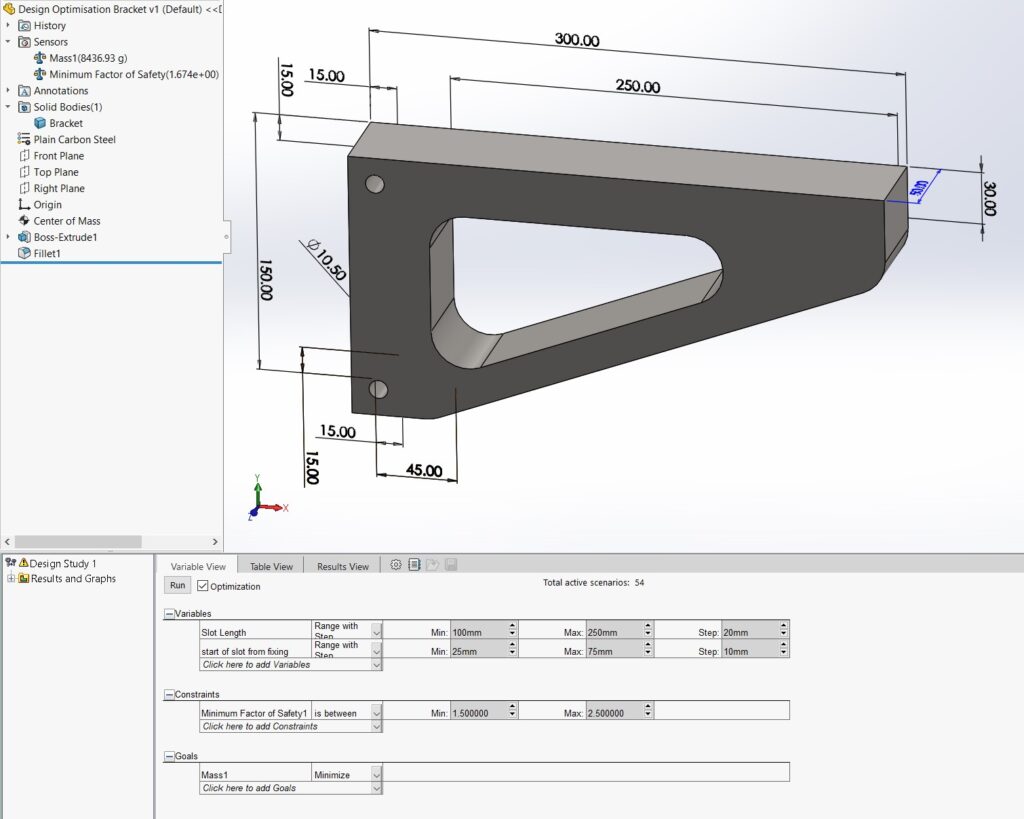
Conducting a New Design Study: a) Designate the slot length as a variable parameter, with values ranging from a minimum of 100mm to a maximum of 250mm, and incrementing by 20mm. This variable adjustment allows for exploring the impact of slot length on the design’s performance, facilitating an informed decision-making process for optimising the design. b) Set a constraint on the Factor of Safety, ensuring it remains within the 1.5 to 2.5 range. This constraint is crucial for guaranteeing the design maintains its structural integrity and safety under all tested conditions. c) Target the minimisation of mass as the primary goal, with the optimisation option selected, and initiate the study. This goal is aimed at achieving the most efficient design possible in terms of material usage, which is beneficial for cost reduction, environmental considerations, and compliance with project specifications or regulatory requirements.
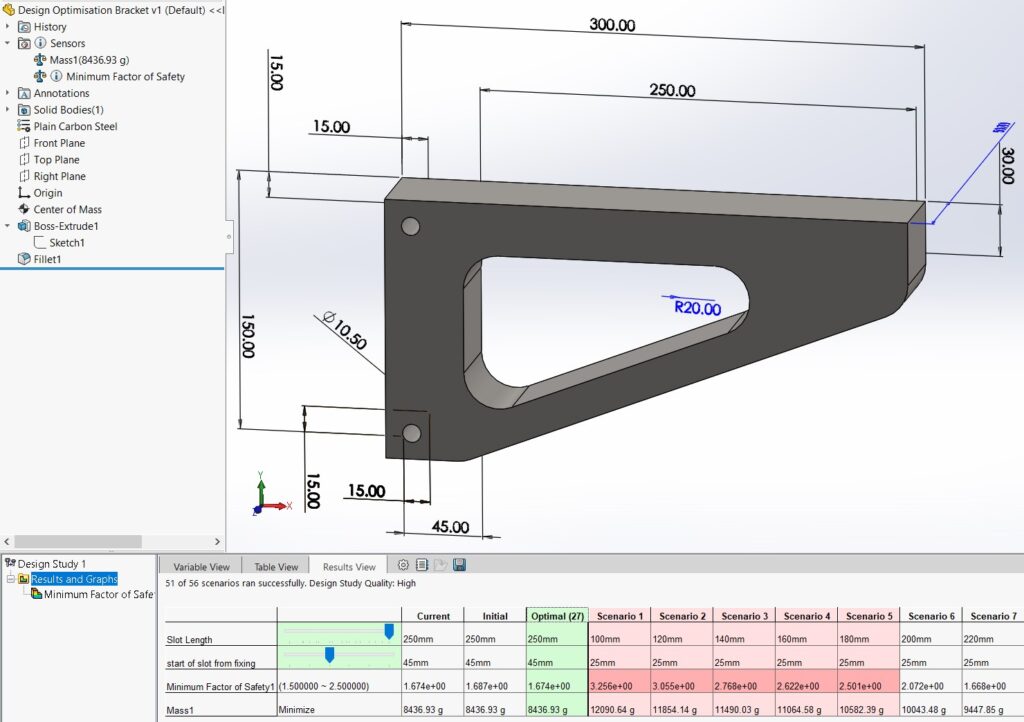
Selection of the Optimum Scenario: Upon completion of the design study, evaluate and select the scenario that best meets the predefined criteria, taking into account the balance between safety, performance, and efficiency. Subsequently, re-run the static simulation study to validate the performance of the chosen design, ensuring it meets all requirements and is ready for further development, testing, or production.
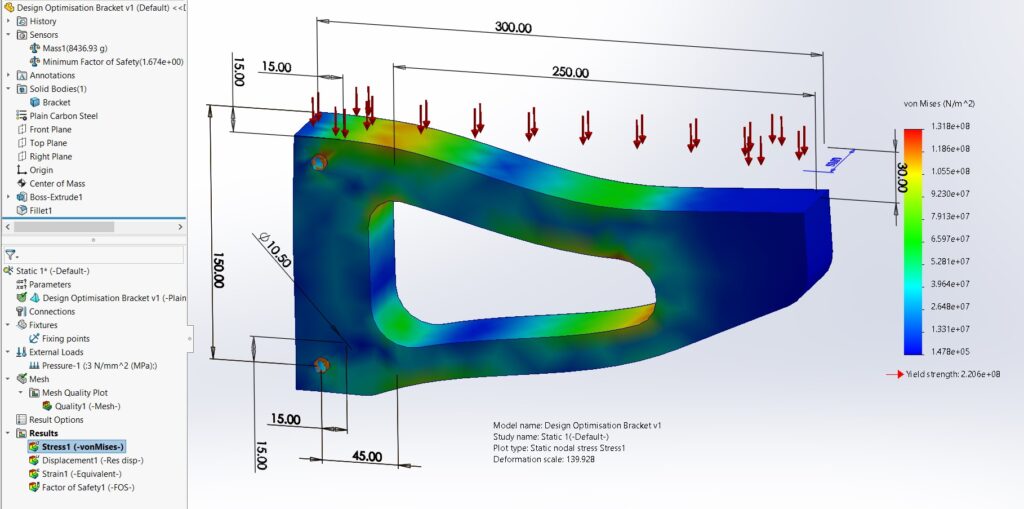
The refined process of design optimisation in SolidWorks, particularly with the integration of sensors, is immensely beneficial for several reasons, and it significantly contributes to time-saving in the engineering design process.
- Streamlined Design Process: By starting with a clear model construction and systematically moving through static simulation studies, fixture applications, and load analyses, engineers can methodically evaluate the design’s performance under various conditions. This structured approach eliminates guesswork, allowing for a more efficient design process where issues can be identified and addressed early on.
- Material Selection and Simulation: Choosing a common material like plain carbon steel and conducting simulations helps in quickly assessing the design’s feasibility and structural integrity. This early validation saves considerable time by avoiding the need for multiple physical prototypes and tests, enabling engineers to focus on designs that are viable from the start.
- Real-World Conditions Mimicking: Applying fixtures and external loads that mimic real-world conditions ensures that the simulations provide realistic and relevant results. This relevance is crucial for making informed decisions early in the design process, reducing the need for extensive modifications later, thereby saving time and resources.
- Safety Margin Analysis: Conducting Factor of Safety (FoS) analyses under increased loads allows engineers to understand the design’s resilience beyond typical operational conditions. This foresight helps in designing products that are not only fit for purpose but also have a built-in safety margin, reducing the risk of failure and the need for redesigns, thus saving time in the long run.
- Efficient Mass Control: The integration of mass sensors and setting specific alerts for mass limits ensures the design stays within desired weight specifications. This control is particularly useful for maintaining material efficiency, which can reduce manufacturing costs and time by avoiding over-engineering or under-engineering parts.
- Continuous Monitoring and Optimisation: Implementing sensors for continuous monitoring of critical parameters like FoS allows for real-time adjustments and optimisation. This dynamic approach to design optimisation means potential issues can be identified and rectified promptly, significantly reducing the iterative cycle of testing and modification.
- Targeted Design Studies: Conducting design studies with specific variables and constraints streamlines the optimisation process, allowing engineers to focus on parameters that significantly impact the design’s performance. By systematically exploring these variables, engineers can quickly identify the most efficient design configurations, saving considerable time in the decision-making process.
- Validation of Optimal Designs: Selecting and validating the optimal design scenario through further simulation studies ensures that the chosen design meets all necessary criteria and is ready for further development or production. This final validation step confirms the design’s suitability, significantly reducing the likelihood of costly and time-consuming revisions later in the product development lifecycle.
Overall, the integration of sensors and the systematic approach to design optimisation in SolidWorks not only enhances the efficiency and reliability of the engineering design process but also significantly reduces the time required to move from concept to validated design. This efficiency is crucial in today’s fast-paced engineering environments, where time savings can lead to faster project completions, reduced costs, and a competitive advantage in the market.