


Leveraging SolidWorks for Efficient Assembly and Enhanced Fixture Durability
Using SolidWorks for the precise positioning of pillow bearings on an assembly axis significantly outperforms traditional manual methods of finding the fulcrum, offering unparalleled accuracy, efficiency, and substantial time savings. This article delves into the benefits of employing SolidWorks for this essential task in mechanical design, ensuring smooth assembly rotation and extended bearing lifespan.
Precision and Accuracy: SolidWorks delivers high precision and accuracy when positioning components. The software’s capability to establish a new coordinate system at the assembly’s centre of mass is pivotal, ensuring bearings align flawlessly with the axis. This eliminates common manual positioning errors like imbalance or misalignment, which are detrimental to the assembly’s rotation and the durability of the bearings.
Efficiency and User-Friendly Interface: The intuitive nature of SolidWorks, combined with its extensive library of standard components including pillow bearings, streamlines the assembly process. Users can effortlessly place components into the assembly, while the software’s smart mates feature intuitively recommends appropriate constraints, enhancing the design process’s speed and simplicity.
Time Savings: The time efficiency of SolidWorks is remarkable. Tasks that might take hours through manual positioning, such as aligning components and establishing a new coordinate system, can be completed in minutes. Depending on the assembly’s complexity and the user’s proficiency, SolidWorks can reduce the design time by 50-70%.
This essential tool streamlines fixture assembly and accuracy, saving time and effort with your mechanical design.
Simulation and Verification: One of the standout features of SolidWorks is its advanced simulation capabilities, which are absent in manual methods. Designers can virtually test the assembly’s rotation, identifying and rectifying potential issues early in the design phase, saving further time and resources.
Iterative Design and Adjustments: SolidWorks simplifies the process of making design adjustments or iterations. Changes to the bearings’ position or type, or modifications to the assembly itself, can be swiftly executed, allowing for a dynamic design process where enhancements and optimisations are readily explored.
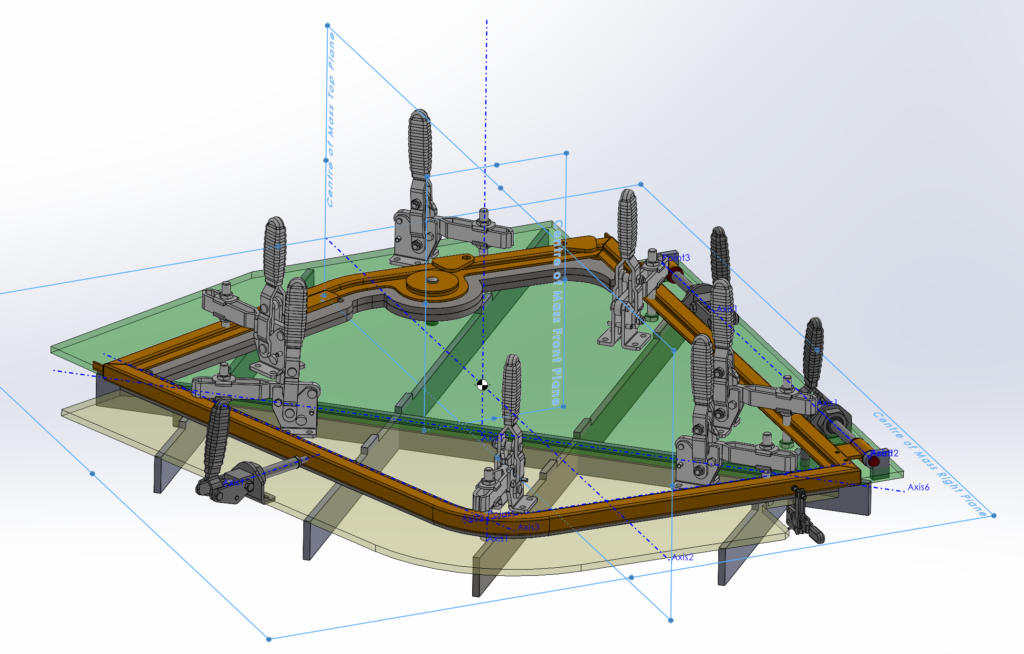
Before we get started we first need to create reference geometry through the centre of mass in our assembly to do so follow these steps:
- Determine the Center of Mass: Go to the Evaluate tab and select the Mass Properties option to find the centre of mass for the part or assembly you are working with. The Mass Properties dialog box will show you the center of mass among other properties.
- Create a New Coordinate System at the Center of Mass: With the centre of mass identified, you can now create a new coordinate system at this exact location. To do this, go to the Reference Geometry dropdown in the Features tab and select Coordinate System. In the Coordinate System property manager, for the origin definition, select the Center of Mass option, which will automatically position the new coordinate system at the centre of mass. You might need to adjust the orientation of the axes if necessary by selecting appropriate references in the model.
- Create Reference Geometry Using the New Coordinate System: Utilise the newly created coordinate system to establish reference geometry such as planes or axes. For instance, to create a reference plane, you could choose the Plane option from the Reference Geometry dropdown and use the coordinate system’s axes or points as references to define the plane’s position and orientation.
- Utilise the Reference Geometry: The reference geometry you’ve created can now serve as a foundation for building new features, sketches, or in this case placing the pillow bearings within your SolidWorks model.
This method ensures that the reference geometry you create is accurately aligned with the centre of mass, leveraging the new coordinate system as a precise reference point.

Step-by-Step Guide to Positioning Pillow Bearings:
- Preparation: Ensure all assembly components are accurately modelled in SolidWorks for seamless integration of the bearings.
- Inserting Bearings: Utilise the “Design Library” to insert pillow bearings into the assembly, positioning them near the desired axis location.
- Aligning Bearings: Use the “Mates” feature to concentrically align the bearings with the axis created earlier, ensuring central placement.
- Verifying Rotation: Check that the assembly can rotate smoothly through 180 degrees, making any necessary adjustments for unimpeded movement.
- Fine-Tuning: Make any required fine adjustments to the bearings’ position to eliminate binding or excessive play.
Mechanical principles involved
In the context of mechanical design and bearing alignment, the fulcrum plays a critical role in facilitating smooth rotation and balanced load distribution. The fulcrum, typically located at the central pivot point where the bearing is positioned, acts as the point around which the rotating motion occurs. SolidWorks geometry allows engineers to precisely define the location of the fulcrum within the assembly, ensuring optimal alignment and functionality.
By accurately positioning the fulcrum using SolidWorks, a balanced distribution of forces along the bearing axis can be achieved, minimising friction and wear. This precise alignment ensures that the bearing can effectively support the applied loads and facilitate smooth rotation without excessive stress or strain.
In essence, SolidWorks enables engineers to harness the principles of mechanical design, including the concept of the fulcrum, to achieve precise bearing alignment and optimise the performance of mechanical assemblies. The mechanical principles involved are primarily around the concepts of alignment, load distribution, and friction management within mechanical assemblies. Here’s a breakdown of these principles:
- Alignment and Positioning: The correct alignment of pillow bearings along an assembly axis is crucial for ensuring the smooth rotation of the shaft or component they support. Misalignment can lead to uneven load distribution and increased wear on the bearings and the shaft. SolidWorks facilitates precise alignment by allowing the creation of a new coordinate system at the assembly’s centre of mass, ensuring that the bearings are perfectly aligned with the rotational axis.
- Load Distribution: Pillow bearings are designed to support a radial load, with the bearing surface parallel to the shaft. Proper positioning ensures that the load is evenly distributed across the entire bearing surface, minimising stress and potential deformation. This uniform load distribution is critical for the longevity and performance of the bearing and the assembly as a whole.
- Friction Management: Bearings are integral in managing friction within mechanical systems. By facilitating smoother rotation, they reduce the resistance encountered by moving parts. Precise positioning minimises unnecessary friction that could result from misalignment, thus enhancing efficiency and reducing energy consumption.
- Vibration Reduction: Properly aligned and positioned bearings help in reducing vibrations within the assembly. Excessive vibration can lead to noise, wear, and eventual failure of mechanical components. By ensuring that bearings are accurately placed, SolidWorks contributes to the stability and reliability of the assembly.
- Thermal Considerations: Bearings and the shafts they support can generate significant heat due to friction. Correct positioning ensures optimal heat dissipation and prevents overheating, which can degrade the bearing material and lubricant, leading to premature failure.
- Dynamic Loading: Mechanical assemblies often face dynamic loads, which vary in magnitude and direction. Precise bearing positioning allows for the accommodation of these loads without compromising the assembly’s integrity or performance.
- Tolerance and Fit: The interaction between the bearings, the shaft, and the housing involves careful consideration of tolerances and fits. SolidWorks enables designers to specify these parameters accurately, ensuring that components fit together as intended without too tight or too loose a fit, which could affect performance.
By leveraging SolidWorks for the positioning of pillow bearings, engineers can apply these mechanical principles more effectively, leading to assemblies that are more efficient, durable, and reliable.

Conclusion: The utilisation of SolidWorks for positioning pillow bearings within an assembly not only augments the design’s precision and reliability but also offers significant efficiency and time savings. By harnessing SolidWorks’ tools for component placement, alignment, simulation, and iterative design, engineers can achieve a streamlined workflow, reducing what could be hours of manual work to mere minutes. This efficiency underscores SolidWorks’ invaluable role in modern mechanical design, particularly in tasks requiring exact precision like the positioning of pillow bearings for optimal assembly rotation.